
Linux
性能领域工具图谱
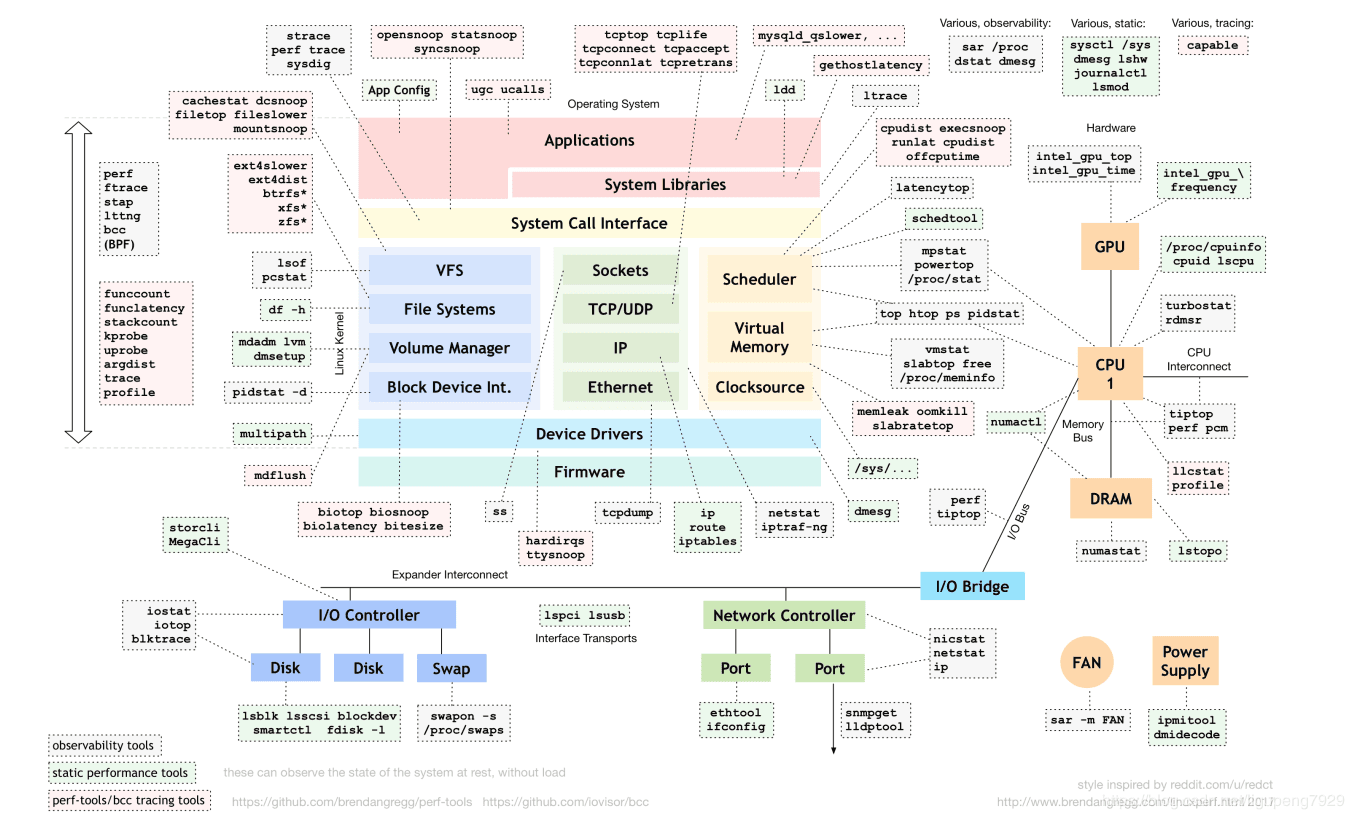
常用命令
| Category | Command | Function | Example | Note |
|---|---|---|---|---|
| . | grep | grep 查找 | grep -ar "select" ./conf | |
| . | sed | sed 编辑 | ||
| . | awk | awk 分析 | awk '{arr[$3]++}END{for(i in arr) print substr(i,0,length(i)-1)}' | |
| . | xargs | 将标准输入作为命令的参数 | `ps -ef | pgrep %s |
| . | lsof | `lsof | grep -i delete` | |
| . | nohup | sudo nohup xxx & | ||
| . | top | 内存排序 : top -a -n 1 -cCPU排序 : top -n 1 -c | ||
| . | tcpdump | tcpdump -i any -Xxns0 -c 100 host xx.xx.xx.xx and port xxxx | ||
| . | perf | perf top -p {pid} | ||
| . | iftop | |||
| . | dos2unix | |||
| . | pstree | pstree -c -a > pstree.log | ||
| . | ulimit | ulimit [type: -H/-S] [cmd: -a/...] [arg: 0/unlimited/...] | ||
| . | strace | strace -p 34542 -s 128 -T | truss、strace 以及 ltrace |
命令集锦
- gdb
- gdb [bin] core_dump
- gdb attach [pid]
- c : continue
- memcache
memcache: telnet host port 强制退出:ctrl + ']' stats stats cachedump slabs_id limit_num - 自启动
# 下面任务可以在 chkconfig 配置自启动 /etc/init.d/* # 直接写到脚本里面 /etc/rc.local # 查看某个服务(下面以redis为例)是否自启动 chkconfig --list|grep redis # 如果 3,4,5为 off则不会自启动 - 没有配置host时,函数 gethostbyname 会返回空:
- 修改:/etc/hosts
- 修改(重启后依然生效):/etc/sysconfig/network
- 执行(当次生效):hostname xxx
- crontab
- 用户 : /var/spool/cron/*
- 系统 : /etc/crontab、/etc/cron.d
- 不常用 : /etc/[cron.hourly、cron.daily、cron.weekly、cron.monthly]
systemctl
- CentOS 7
- 位置:服务systemctl脚本存放在:(配置文件优先级依次从低到高)
- /usr/lib/systemd/,有系统 system 和用户 user 之分,即:/usr/lib/systemd/system 和 /usr/lib/systemd/user
- /run/systemd/system
- /etc/systemd/system
- 开机启动
- systemctl enable [service, 如:nginx.service]
- 关机/重启
- systemctl poweroff
- systemctl reboot
- 位置:服务systemctl脚本存放在:(配置文件优先级依次从低到高)